A good place to start for sizing Microsoft AD, Exchange, MSSQL, System Center, Forefront and Sharepoint, would be the technet.
Windows Server
Exchange Server
MS SQL
System Center
ForeFront
SharePoint
The documentation includes deployment planning, architecture design, h/w sizing, virtualized environment, but you actually have to spend some time to absorb the info, and some imagination to visualize it (there isn't much images to support the documentations)
Wednesday, October 6, 2010

Wednesday, September 29, 2010
Hyper-V and System Center Licensing

The below is only discussing Server Management. Client Management (e.g. desktop/laptops) not included in this discussion.
Hyper-V licensing:
1 Windows Server Standard lets you install 1 VM on top of the parent partition.
OR in the case of VMware, you may install 1 VM with Windows Standard License
1 Windows Server Enterprise lets you install 4 VMs. 1 Datacenter (Per Proc) lets you install Unlimited VMs as long as you licensed all Processors on the Host.
Example:
Customer wants to run 6 VMs on two ESX hosts. 4 VMs in Host A and 2 VMs in Host B.
License required:
2 Enterprise. 1 for each Host. Customer can run 2 more VMs on Host B.
OR
1 Enterprise + 2 Std.
When DRS move the VMs around, the licensing does not vary because when you calculate the licensing, it is based on the initial design stage.
The price for 2 Enterprise is similar as 1 Datacenter License. Technically, you can justify in the way that if there are more than 8 VMs on the Host, it might be cheaper to go Datacenter License for a single processor machine.
If it's 2 Processors, then more than 16 Vms should be able to justify.
System Center Licensing:
There are 6 components as to date in the System Center Product Family.
1. System Center Configuration Manager (SCCM) - SW/HW Inventory, Patch, Software/App Distribution & Metering, O/S Deployment etc
2. System Center Operation Manager (SCOM) -
Monitor server health, performance and availability
3. System Center Data Protection Manager (SCDPM) -
Backup & Restore of Microsoft applications and servers
4. System Center Virtual Machine Manager (SCVMM)-
Manage multiple virtualization hosts, e.g. 2 Hyper-V hosts and 1 VMware host with 5 Virtual Machines in each host.
5. System Center Service Manager (SCSM)-
Service Mgmt system for Incident & Problem Mgmt, Change Mgmt and User Self Service (for software request etc.). Integrates with SCCM and SCOM.
6. Opalis
IT Process Automation, integrates heterogeneous management platforms to allow interoperability, e.g. SCCM <-> BMC Remedy
Each of the products comes with Managing License (ML) for each of the server you wish to manage. The ML also comes in Std and Ent version for different featuers, Ent version lets you monitor the Application (e.g. MSSQL, AD, Exchange)
Example,
Customer has 5 Physical Server, 1 of the Server is running 5 VMs, and wishes to use SCOM to manage the environment.
License required:
10 SCOM Std ML + 1 SCOM Server license
Example,
Customer has 5 Physical Server, 1 of the Server is running 5 VMs, 2 other servers are running MSSQL, and wishes to use SCOM to manage the environment.
License required:
8 SCOM Std ML + 2 SCOM Ent ML (For MSSQL) + 1 SCOM Server license
Only SCOM and SCCM requires server license. For SCDPM and SCVMM, only ML is required, there is no license for the server.
Example,
Customer has 5 Physical Server, 1 of the Server is running 5 VMs, and wishes to use SCDPM to backup the environment.
License required:
10 SCDPM Std ML
OR
4 SCDPM Std ML and 1 SCDPM Enterprise ML for the Host
SCVMM has an Workgroup Suite which lets you manage up to and only 5 Hosts, and all the VMs running on these 5 Hosts.
Example,
Customer has 5 Physical Server, all servers are running VMs, and wishes to use SCVMM to manage the environment.
License required:
1 SCVMM Workgroup License
SMSE and SMSD
SCSM and Opalis are the latest addition into the family. This addition affects the Server Management Suite Enterprise (SMSE) and Server Management Suite Datacenter (SMSD) packaging and price.
1. Server Management Suite Enterprise (SMSE) Per Device -
Includes Managing License for the 6 Products stated above. Only Managing License. Server license for SCOM and SCCM needs to be purchased seperately. For VMs, Enterprise Suite lets you manage up to 4 VMs.
2. Server Management Suite Datacenter (SMSD) Per Proc-
Includes Managing License for the 6 Products stated above. Only Managing License. Server license for SCOM and SCCM needs to be purchased seperately. For VMs,
Datacenter Suite lets you manage unlimited VMs on the licensed Host.
System Center Essentials
Targeting Mid Market Bundle, System Center Essentials offers the range of products in limited features. (You can only manage up to 30 Server and 500 Clients using Essentials)
The price for Essentials are much cheaper compared to SMSE and SMSD
Creating Hyper-V Failover Cluster in 2008 R2
Step by step walkthrough on creating Hyper-V Failover Cluster.
Creating Hyper-V Failover Cluster (Part 1)
Creating Hyper-V Failover Cluster (Part 2)
Creating Hyper-V Failover Cluster (Part 1)
Creating Hyper-V Failover Cluster (Part 2)
Thursday, September 23, 2010
Zimbra - new generation of Email solution (Exchange no more?)

Zimbra used to be on yahoo platform and is now acquired by VMware and sold as a virtual appliance with features like "easy setup", "lower TCO than Exchange", "Support more users with less"...
Below quoted from University of Pennsylvania : Zimbra case study
"Adam says they have found Zimbra takes significantly fewer man-hours to administer. In absolute terms Exchange servers take 33% more effort and require one extra full-time headcount per year — even with 4.4 times more users on the Zimbra servers."
Full story link as below
Zimbra TCO Bests Microsoft Exchange in University of Pennsylvania Case Study
Zimbra case studies
Sunday, September 12, 2010
ESX and ESXi - 4.1 version
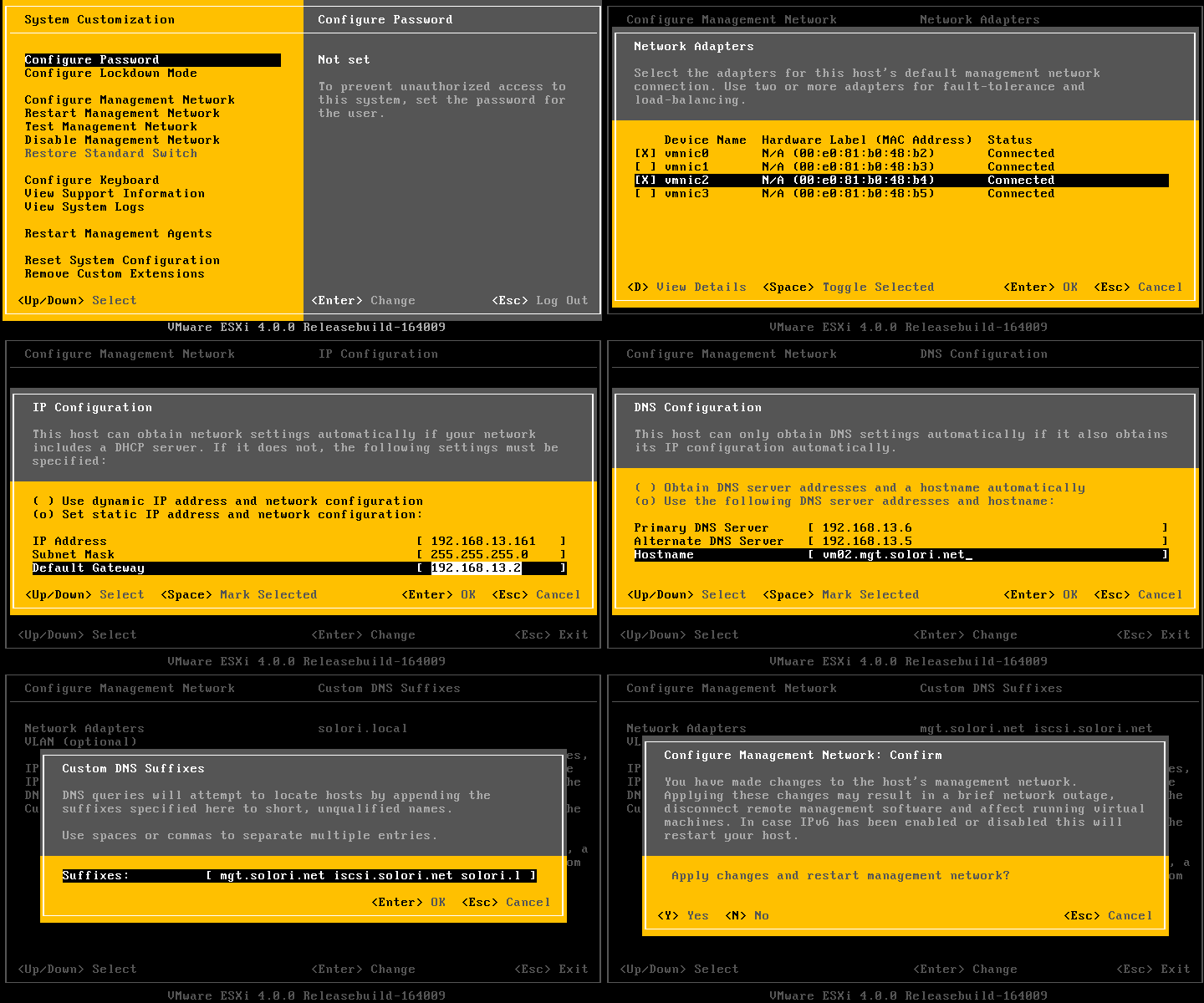
vSphere 4.1 will be the last version that supports ESX. For future deployments, customers are encouraged to go into ESXi. Main reason is for better security, standardized deployment and keeping the hypervisor layer simple, and keep the complicated stuff in the management layer.
Vmware vSphere 4.1 editions
KB on ESX and ESXi comparison (Detailed)
Tech Support Mode in 4.1
4.1 vCLI
4.1 PowerCLI
Upgrade ESX to ESXi
vSphere Management Assistant (vMA)
Tuesday, September 7, 2010
VMware vShield Manager 4.1 and vShield Family 1.0 ( vShield Edge, App and Endpoint )
Along with cloud infrastructure stepping into new era, the launching of vCloud Director. VMware also announced new range of security products focusing on enhancing security capabilities within cloud environment.
vShield Products Family : vShield App, vShield Edge and vShield Endpoint
Related documents:
vShield 4.1 Quickstart
vShield 4.1 Administrator Guide
After reading thru vShield 4.1 Quickstart, these are the basic concepts which I've derived.

vShield Manager - Central manager for vShield Products. OVA based image to be imported via vCenter and can be hosted on any ESX host. Need to be able to communicate will all vShield products in the environment.
vShield Edge - Focusing on virtual datacenter and public network and internal network isolation. Based on Portgroups. Installation at standard switch portgroups, vDS portgroups or Cisco Nexus 1000v.
vShield App - Focusing on creating different network segments within a datacenter, possibly trying to replace VLAN function. Allowing users to isolate networks into DMZ, Test, Production etc. Based on apps. Virtual Appliance Installation at every ESX host.
vShield Endpoint - Antivirus at ESX host level. Virtual Appliance installation at every ESX host. Supports windows servers, windows drivers needs to be installed on each VMs based on 32/64bit and OS versions.
Need to go thru administration guide to find out more details.
vShield Products Family : vShield App, vShield Edge and vShield Endpoint
Related documents:
vShield 4.1 Quickstart
vShield 4.1 Administrator Guide
After reading thru vShield 4.1 Quickstart, these are the basic concepts which I've derived.

vShield Manager - Central manager for vShield Products. OVA based image to be imported via vCenter and can be hosted on any ESX host. Need to be able to communicate will all vShield products in the environment.
vShield Edge - Focusing on virtual datacenter and public network and internal network isolation. Based on Portgroups. Installation at standard switch portgroups, vDS portgroups or Cisco Nexus 1000v.
vShield App - Focusing on creating different network segments within a datacenter, possibly trying to replace VLAN function. Allowing users to isolate networks into DMZ, Test, Production etc. Based on apps. Virtual Appliance Installation at every ESX host.
vShield Endpoint - Antivirus at ESX host level. Virtual Appliance installation at every ESX host. Supports windows servers, windows drivers needs to be installed on each VMs based on 32/64bit and OS versions.
Need to go thru administration guide to find out more details.
Sunday, September 5, 2010
Storage IO Calculation - Basics

YellowBricks - IOPs?
Calculate IOPS in a storage array
Excellent White Paper explaining resources sizing in VDI environment
Calculating Disk Usage using Diskmon
New !! Open unofficial storage performance thread
Avg IOPs:
7200 RPM - 75
10K RPM - 125
15K RPM - 175
RAID penalty:
Raid 0 : R=1, W=1
Raid 1 and 10 : R=1, W=2
Raid 5 : R=1, W=4
Raid 6 : R=1, W=6
Below quote from Yellow bricks
So how do we factor this penalty in? Well it’s simple for instance for RAID-5 for every single write there are 4 IO’s needed. That’s the penalty which is introduced when selecting a specific RAID type. This also means that although you think you have enough spindles in a single RAID Set you might not due to the introduced penalty and the amount of writes versus reads.
I found a formula and tweaked it a bit so that it fits our needs:
(TOTAL IOps × % READ)+ ((TOTAL IOps × % WRITE) ×RAID Penalty)
So for RAID-5 and for instance a VM which produces 1000 IOps and has 40% reads and 60% writes:
(1000 x 0.4) + ((1000 x 0.6) x 4) = 400 + 2400 = 2800 IO’s
The 1000 IOps this VM produces actually results in 2800 IO’s on the backend of the array, this makes you think doesn’t it?
Friday, September 3, 2010
New era of cloud computing
Sept 1st. VMware officially announced vCloud Director, the core engine in enabling customers to build private cloud and subsequently, works towards public cloud infrastructure.
What vCloud Director essentially does is providing the workflow engine to automate and manage datacenter resources into pools of flexible and scalable resources. At the same time providing these pools as on-demand, SLA guaranteed resources to Business users, which they can self-provision thru self-service portal.
End result = transform internal IT department -> private IAAS hosting provider.
Benefits =
1. Readily, on-demand resources. -> Increased agility, flexibility and efficiency of IT resources
2. Self-service portal combined with Chargeback system for business users.
3. SLA guaranteed thru High Availability features.
4. Automated provisioning workflow -> reduce TCO
5. Stepping stone in enabling enterprises to leverage on Cloud Services which will be the next Gen computing.
6. Help customers to eliminate floor space or Geographic boundaries concerns -> Help to reach out to new set of customers (with limited floor space, lots of remote branches, global operations that requires great flexibility in IT provisioning)

These are some of the products that focuses on the Cloud, announced during VMWorld 2010
The hottest virtualization products at VMworld
Eight great virtual appliances for VMware, free for the downloading
Alot more products are coming out from VMware. Including Application Platform, Networking, Cloud-wide Authentication, Virtual Appliance for Cloud... etc.
With Virtualization -> the crucial part are Network and Storage.
With Cloud -> the crucial part are Network, Storage and Security.
What vCloud Director essentially does is providing the workflow engine to automate and manage datacenter resources into pools of flexible and scalable resources. At the same time providing these pools as on-demand, SLA guaranteed resources to Business users, which they can self-provision thru self-service portal.
End result = transform internal IT department -> private IAAS hosting provider.
Benefits =
1. Readily, on-demand resources. -> Increased agility, flexibility and efficiency of IT resources
2. Self-service portal combined with Chargeback system for business users.
3. SLA guaranteed thru High Availability features.
4. Automated provisioning workflow -> reduce TCO
5. Stepping stone in enabling enterprises to leverage on Cloud Services which will be the next Gen computing.
6. Help customers to eliminate floor space or Geographic boundaries concerns -> Help to reach out to new set of customers (with limited floor space, lots of remote branches, global operations that requires great flexibility in IT provisioning)

These are some of the products that focuses on the Cloud, announced during VMWorld 2010
The hottest virtualization products at VMworld
Eight great virtual appliances for VMware, free for the downloading
Alot more products are coming out from VMware. Including Application Platform, Networking, Cloud-wide Authentication, Virtual Appliance for Cloud... etc.
With Virtualization -> the crucial part are Network and Storage.
With Cloud -> the crucial part are Network, Storage and Security.
Tuesday, August 10, 2010
VMware reference
vreference.com
for vsphere card and firewall diagram
vsphere configuration maximum
vsphere evaluation: when license expired, VMs cannot be powered up when rebooted.
Host will be disconnected from vCenter and cannot be rejoined.
Virtual Appliance
Openfiler - Can use this for simulate iSCSI or NFS storage using virtual appliance.
When using vConverter, download the PDF guide as reference. Alot of considerations to be made for different type of OS. vSphere 4 now supports Linux convertion.
EVC can widen the CPU compatibility range. slightly. But still don't try CPU family range too far apart.
You Can check the whether the CPU is covered by the EVC in documentation.
You can only create resource pool in cluster, when you turned on DRS.
HA Heartbeat
ESX Classic uses Service Console
ESXi uses VMKernel
Hot clone - reconfig and customization (not recommended, greatly reduce success rate)
Cold clone - using vCenter converter boot Cd. because somtimes the agent cannot be installed successfully on source OS, and you don't want to troubleshoot on it. Just use the CD to boot and convert.
Standalone converter is a better option. Better success rate and more resillient.
1. It's mobile.
2. P2V Higher success rates.
RVTools - Good for checking VMs connecting to any ROM. eg. connecting to ISO. This is to verify when doing vMotion.
When vMotion, CPU family are different, if you get this error message "Host CPU incompatible, refer to "ECX", you can refer to VMWare KB:1993
Can help to bypass the CPUID checks.
Refer to IBM Vmotion configuration guide and HP vMotion Configuration guide.
to check HW range compatible to run vMotion
www.vcp410.com / www.vcp410.net
Student ID: 4832871
for vsphere card and firewall diagram
vsphere configuration maximum
vsphere evaluation: when license expired, VMs cannot be powered up when rebooted.
Host will be disconnected from vCenter and cannot be rejoined.
Virtual Appliance
Openfiler - Can use this for simulate iSCSI or NFS storage using virtual appliance.
When using vConverter, download the PDF guide as reference. Alot of considerations to be made for different type of OS. vSphere 4 now supports Linux convertion.
EVC can widen the CPU compatibility range. slightly. But still don't try CPU family range too far apart.
You Can check the whether the CPU is covered by the EVC in documentation.
You can only create resource pool in cluster, when you turned on DRS.
HA Heartbeat
ESX Classic uses Service Console
ESXi uses VMKernel
Hot clone - reconfig and customization (not recommended, greatly reduce success rate)
Cold clone - using vCenter converter boot Cd. because somtimes the agent cannot be installed successfully on source OS, and you don't want to troubleshoot on it. Just use the CD to boot and convert.
Standalone converter is a better option. Better success rate and more resillient.
1. It's mobile.
2. P2V Higher success rates.
RVTools - Good for checking VMs connecting to any ROM. eg. connecting to ISO. This is to verify when doing vMotion.
When vMotion, CPU family are different, if you get this error message "Host CPU incompatible, refer to "ECX", you can refer to VMWare KB:1993
Can help to bypass the CPUID checks.
Refer to IBM Vmotion configuration guide and HP vMotion Configuration guide.
to check HW range compatible to run vMotion
www.vcp410.com / www.vcp410.net
Student ID: 4832871
Tuesday, June 22, 2010
VizionCore - Product Introduction
Main product is vRanger PRO - which specialized in Data protection VM backups.
By the end of August 2010. VizionCore will complete the Quest transition and officially become Quest Software Server Virtualization Management group.
VizionCore is taking VmWare management one step further.
1. vConverter – License is Free. For Technical Support – chargeable
P2V solutions.
Incremental P2V Solutions. For DB etc.
2. vRanger Pro 4.
Typical backup –
Restore involves physical machine setup and agent setup then only data restore.
With vRanger Pro VM Image backup –
eliminate hazzle for setting up physical machine and agent. Go straight to Data Restore.
Features of vRanger Pro.
**Active Block Mapping. (ABM)
There's 3 types of data blocks -> actual data blocks, white space and deleted data blocks.
ABM is able to identify white space and deleted data blocks. Hence only backup actual data blocks.
After ABM, data goes through compression before being backup.
Dedupe will only be available after August 2010.
For Proxy based backup, the bottleneck is at the proxy.
vRanger provides the solution to bypass proxy and store backup direct to target. (critical for scalability). Good for multi sites backup.
New vRanger Pro version 4.5 supports CBT (Change Block Tracking).
vRanger Pro DO NOT backup to tapes. Only Disk to Disk.
3. vReplicator 3.0
Typical site replication scenario:
Storage replication – Expensive and often needs identical storage hardware at both production and DR sites.
Agent based – Agent on actual server, extra license cost for agents and OS at DR sites.
VM Image replication
block detection – eliminate white space, deleted data blocks.
Also Using CBT and Active Block Mapping (ABM)
4. vFoglight
Performance Monitoring- Fast problem detection with easy access.
Capacity Planning – cap sizing. Evaluate impact of change.
Analysis of historical stats. Not simulation.
Chargeback – chargeback to clients based on utilization
Service Management – track SLA of service. No aumation recovery action. Plain monitoring.
** AD and Exchange monitoring soon to be launched.
3rd party system monitoring integration.
Proactive monitoring.
** Webinar.. to show product.
5. VOptimizer
Thin provisioning.
cons – heavy IO apps will have performance reduced.
cons – deleted block space not recovered.
windows only. End of the month Linux also.
Storage cost and growth high. Poor storage utilization. -> which could trigger to additional storage cost and cooling and data centre cost.
auto scan environment for unused space. (vOptimizer WasteFinder)
ROI analysis for re-claimable space. (Actual figures as per input from users)
6. vControl
Self service portal for provisioning of VMs for End Users.
Currently not fully integrated with Chargeback from vFoglight. In order to integrate with Chargeback in vFoglight needs professional service.
Freeware :
vConverter Server Consolidation
vOptimizer wasteFinder
vFoglight quick view
ECOshell
Vizioncore Partner Portal
By the end of August 2010. VizionCore will complete the Quest transition and officially become Quest Software Server Virtualization Management group.
VizionCore is taking VmWare management one step further.
1. vConverter – License is Free. For Technical Support – chargeable
P2V solutions.
Incremental P2V Solutions. For DB etc.
2. vRanger Pro 4.
Typical backup –
Restore involves physical machine setup and agent setup then only data restore.
With vRanger Pro VM Image backup –
eliminate hazzle for setting up physical machine and agent. Go straight to Data Restore.
Features of vRanger Pro.
**Active Block Mapping. (ABM)
There's 3 types of data blocks -> actual data blocks, white space and deleted data blocks.
ABM is able to identify white space and deleted data blocks. Hence only backup actual data blocks.
After ABM, data goes through compression before being backup.
Dedupe will only be available after August 2010.
For Proxy based backup, the bottleneck is at the proxy.
vRanger provides the solution to bypass proxy and store backup direct to target. (critical for scalability). Good for multi sites backup.
New vRanger Pro version 4.5 supports CBT (Change Block Tracking).
vRanger Pro DO NOT backup to tapes. Only Disk to Disk.
3. vReplicator 3.0
Typical site replication scenario:
Storage replication – Expensive and often needs identical storage hardware at both production and DR sites.
Agent based – Agent on actual server, extra license cost for agents and OS at DR sites.
VM Image replication
block detection – eliminate white space, deleted data blocks.
Also Using CBT and Active Block Mapping (ABM)
4. vFoglight
Performance Monitoring- Fast problem detection with easy access.
Capacity Planning – cap sizing. Evaluate impact of change.
Analysis of historical stats. Not simulation.
Chargeback – chargeback to clients based on utilization
Service Management – track SLA of service. No aumation recovery action. Plain monitoring.
** AD and Exchange monitoring soon to be launched.
3rd party system monitoring integration.
Proactive monitoring.
** Webinar.. to show product.
5. VOptimizer
Thin provisioning.
cons – heavy IO apps will have performance reduced.
cons – deleted block space not recovered.
windows only. End of the month Linux also.
Storage cost and growth high. Poor storage utilization. -> which could trigger to additional storage cost and cooling and data centre cost.
auto scan environment for unused space. (vOptimizer WasteFinder)
ROI analysis for re-claimable space. (Actual figures as per input from users)
6. vControl
Self service portal for provisioning of VMs for End Users.
Currently not fully integrated with Chargeback from vFoglight. In order to integrate with Chargeback in vFoglight needs professional service.
Freeware :
vConverter Server Consolidation
vOptimizer wasteFinder
vFoglight quick view
ECOshell
Vizioncore Partner Portal
Wednesday, June 16, 2010
ESX and ESXi : The differences and the limitations
ESXi
1. Free. No license required.
2. Extremely small footprint (32MB on memory), Fast boot up.
3. Do not have service console.
4. Actually running on a newer architecture than ESX
5. Future development will focus on ESXi.
6. Users are encouraged to deploy ESXi.
7. VCenter cannot manage free ESXi without a vSphere license as its APIs only grant read-only access.
ESX
1. vSphere license required.
2. Bigger size compared with ESXi. 2GB.
3. Has service console. Automated scripts supported.
4. works with VCenter depending on the license purchased.

Read more :
How does VMware ESXi Server compare to ESX Server?
ESXi vs. ESX: A comparison of features
1. Free. No license required.
2. Extremely small footprint (32MB on memory), Fast boot up.
3. Do not have service console.
4. Actually running on a newer architecture than ESX
5. Future development will focus on ESXi.
6. Users are encouraged to deploy ESXi.
7. VCenter cannot manage free ESXi without a vSphere license as its APIs only grant read-only access.
ESX
1. vSphere license required.
2. Bigger size compared with ESXi. 2GB.
3. Has service console. Automated scripts supported.
4. works with VCenter depending on the license purchased.

Read more :
How does VMware ESXi Server compare to ESX Server?
ESXi vs. ESX: A comparison of features
Tuesday, June 15, 2010
Netbackup 7 Launching : De-dupe and Virtualization Backup
Symantec launched its Version 7.0 Netbackup at Nikko Hotel today.
Netbackup 7.0 key points:

1. De-dupe
Netbackup 7.0 focus on the idea of de-duplication everywhere. Using de-dupe to significantly cut down the volume to be actually backup/stored. At the same time reduce the resource utilized, e.g. reduced Network traffic, reduced WAN traffic for DR site replication, reduced storage space, reduced backup time.
Of course with de-dupe introduced, some CPU and RAM overhead needs to be accounted for, and it depends on where you decided to actually run the de-dupe algorithm.
a. De-dupe appliances - Data sent from client to media server then onto a de-dupe device to actually do the de-dupe algorithm. Resource is only saved at the final stage when "Unique Data" is written onto storage.
b. Media Server - Data sent from Client to media server and then do a de-dupe at the Media server. Then "Unique data" is written onto storage. Savings is between the media server and the final storage.
c. Client side - Data is de-dupe at client side before heading out to the Media server. Network utilization reduced, Storage required for backup is reduced, backup window is reduced, but some overhead at the CPU and RAM over at client side needs to be sized in.
2. Virtualization Backup.
Apparently Netbackup 7.0 is able to do virtualization backup more efficiently than other competitors. Reason being Netbackup 7.0 only needs to backup once on the vmdk to be able to do both "Whole VM" restoration and "Single File" restoration, whereas other vendors needs to do 2 backups to accomplished that.
A new term "Change Block Tracking" is also mentioned during the briefing. Went to this blog and got some idea about CBT. (Seriously good info for Virtualization and Cloud)
CBT seems to be a new features for Vsphere 4.0 kernel. Instead of writing own code to pull block info from the vsphere kernel, CBT allows the 3rd party apps to query the info directly from the kernel and the result is better efficiency.
It is also used in VSphere 4.0 VMotion where it works like a buffer area to keep track of all the I/O while Vmotion is copying the initial copy of the data files. After initial copy of data files are complete, the CBT will be traced to write the changes into the initial copy. Where at the same time new I/O are traced continuously.
The algorithm goes on until the changes are really small and the copy can be done instantly. The VM will then be suspend/resume (instantly) after the final traces are done. This I guess gives even seamless Vmotion.
Netbackup 7.0 key points:

1. De-dupe
Netbackup 7.0 focus on the idea of de-duplication everywhere. Using de-dupe to significantly cut down the volume to be actually backup/stored. At the same time reduce the resource utilized, e.g. reduced Network traffic, reduced WAN traffic for DR site replication, reduced storage space, reduced backup time.
Of course with de-dupe introduced, some CPU and RAM overhead needs to be accounted for, and it depends on where you decided to actually run the de-dupe algorithm.
a. De-dupe appliances - Data sent from client to media server then onto a de-dupe device to actually do the de-dupe algorithm. Resource is only saved at the final stage when "Unique Data" is written onto storage.
b. Media Server - Data sent from Client to media server and then do a de-dupe at the Media server. Then "Unique data" is written onto storage. Savings is between the media server and the final storage.
c. Client side - Data is de-dupe at client side before heading out to the Media server. Network utilization reduced, Storage required for backup is reduced, backup window is reduced, but some overhead at the CPU and RAM over at client side needs to be sized in.
2. Virtualization Backup.
Apparently Netbackup 7.0 is able to do virtualization backup more efficiently than other competitors. Reason being Netbackup 7.0 only needs to backup once on the vmdk to be able to do both "Whole VM" restoration and "Single File" restoration, whereas other vendors needs to do 2 backups to accomplished that.
A new term "Change Block Tracking" is also mentioned during the briefing. Went to this blog and got some idea about CBT. (Seriously good info for Virtualization and Cloud)
CBT seems to be a new features for Vsphere 4.0 kernel. Instead of writing own code to pull block info from the vsphere kernel, CBT allows the 3rd party apps to query the info directly from the kernel and the result is better efficiency.
It is also used in VSphere 4.0 VMotion where it works like a buffer area to keep track of all the I/O while Vmotion is copying the initial copy of the data files. After initial copy of data files are complete, the CBT will be traced to write the changes into the initial copy. Where at the same time new I/O are traced continuously.
The algorithm goes on until the changes are really small and the copy can be done instantly. The VM will then be suspend/resume (instantly) after the final traces are done. This I guess gives even seamless Vmotion.
Saturday, June 12, 2010
Cloud Computing : The next gen of computing industries infrastructure.
Cloud Computing has been around since 2007 and it's becoming more and more of a hot topic, just like how virtualization has infiltrated the industry. Exactly what is Cloud Computing?
From my understanding, Cloud Computing is an initiative, the idea to change the currently "Device Metric" computing infrastructure, into a "User, App, Service Metric" infrastructure.
In current industry, when a new service / application is required by the organization, a normal workflow which includes quotation for hardwares and apps, the design of network layout, security metrics, backup design, Disaster Recovery design and High Availability design. All and all, the project is still driven by devices, where each project will actually have their own hardwares / devices.
With the introduction of virtualization, industry is starting to change whereas hardwares are utilized more efficiently, and it offers scalability and flexibility for apps and services. At the same time, DR and HA options has become an easier approach with the help of virtualization. The segregation of "Devices" is becoming ambiguous.
With Cloud Computing, the idea is to run the IT in the organisation as a service provider. By using virtualization, the whole underlying hardwares can be seen as a giant pool of resources which provides flexibility and high availability. Apps and services can be provisioned for new requirements as soon as the approval is completed by the Managers. The workflow to acquire a quotation and table the pricing to the users is no longer required, instead, a chargeback system is used to calculate the amount of resources the users are using. (e.g. storage, CPU, backup, etc)
The giant resource pool, this is what we call a "Cloud".
Cloud can also be ran externally, where apps and services are hosted on vendors premises. Organisation can still have their own management and control over the apps and services as if the machines resides in their own premises. The main advantage of this is the provision and expansion of your organisation services to strategic locations, without having to setup a new premises with its own hardwares, much like how global services (google, facebook, msn..) works.
This is what we call a "Public Cloud"

VMware Cloud Computing
Private Cloud Computing intro
Cool demonstration on how automation and virtualization helps to provide a consistent level of service
VMware president and CEO, Paul Maritz, talks about the Cloud and VCloud initiative
VCloud Blog
I believe the biggest challenge for IT managers going forward to Cloud computing is the justification for the initial setup and the cost of restructuring the IT organisation.
From my understanding, Cloud Computing is an initiative, the idea to change the currently "Device Metric" computing infrastructure, into a "User, App, Service Metric" infrastructure.
In current industry, when a new service / application is required by the organization, a normal workflow which includes quotation for hardwares and apps, the design of network layout, security metrics, backup design, Disaster Recovery design and High Availability design. All and all, the project is still driven by devices, where each project will actually have their own hardwares / devices.
With the introduction of virtualization, industry is starting to change whereas hardwares are utilized more efficiently, and it offers scalability and flexibility for apps and services. At the same time, DR and HA options has become an easier approach with the help of virtualization. The segregation of "Devices" is becoming ambiguous.
With Cloud Computing, the idea is to run the IT in the organisation as a service provider. By using virtualization, the whole underlying hardwares can be seen as a giant pool of resources which provides flexibility and high availability. Apps and services can be provisioned for new requirements as soon as the approval is completed by the Managers. The workflow to acquire a quotation and table the pricing to the users is no longer required, instead, a chargeback system is used to calculate the amount of resources the users are using. (e.g. storage, CPU, backup, etc)
The giant resource pool, this is what we call a "Cloud".
Cloud can also be ran externally, where apps and services are hosted on vendors premises. Organisation can still have their own management and control over the apps and services as if the machines resides in their own premises. The main advantage of this is the provision and expansion of your organisation services to strategic locations, without having to setup a new premises with its own hardwares, much like how global services (google, facebook, msn..) works.
This is what we call a "Public Cloud"

VMware Cloud Computing
Private Cloud Computing intro
Cool demonstration on how automation and virtualization helps to provide a consistent level of service
VMware president and CEO, Paul Maritz, talks about the Cloud and VCloud initiative
VCloud Blog
I believe the biggest challenge for IT managers going forward to Cloud computing is the justification for the initial setup and the cost of restructuring the IT organisation.
Friday, June 11, 2010
Thursday, June 10, 2010
Exchange 2003 : System Attendant Service could not be started. DSAccess - Topology Discovery Failed.
Early this morning I received a critical call where the Exchange 2003 Server has went down. Went on site and discovered that the server could not be brought up due to System Attendant service hung during startup.
1. Exchange Server could not be boot into Normal Mode with Exchange System Attendant service enabled.
2. Boot into Safe Mode and disable Exchange System Attendant and Exchange Information Store Service. Reboot and able to boot into Normal Mode.
3. Attempts to start Exchange System Attendant failed. Service could not be started as normal.
4. Event logs > Application logs showing multiple entries of the below errors.
Event Type: Error
Event Source: MSExchangeDSAccess
Event Category: Topology
Event ID: 2114
Date: 10/06/2010
Time: 1:01:14 PM
User: N/A
Computer: MYKLX001
Description:
Process MAD.EXE (PID=4788). Topology Discovery failed, error 0x80040920.
For more information, click http://www.microsoft.com/contentredirect.asp.
Event Type: Error
Event Source: MSExchangeFBPublish
Event Category: General
Event ID: 8213
Date: 10/06/2010
Time: 1:01:14 PM
User: N/A
Computer: MYKLX001
Description:
System Attendant Service failed to create session for virtual machine MYKLX001. The error number is 0xc10306ce.
For more information, click http://www.microsoft.com/contentredirect.asp.
We tried to source solution from the internet. The most direct answer from Google is the below KB.
Exchange services do not start, and event IDs 2114 and 2112 are logged in the Application log in Exchange Server 2003 or in Exchange 2000 Server
This KB assumes that the problem lies with the security access of the Exchange Enterprise Servers Group. Hence the verification on the Default Domain Policy, Default Domain Controller Policy and the User Rights Assignment, and the DomainPrep and so on.
However, we verified the above and even ran the DomainPrep, the problem is still not solved. System Attendant still fails due to Topology Discovery Failure.
**Time is running short as the managers need the emails to be up a.s.a.p**
Without a clue, we were forced to consult Microsoft PSS.
Within 10 minutes, Microsoft engineer discovered the source of the problem.
Within the Exchange Server Netlogon Service Registry lies a Key that record the value of the AD site to be contacted when System Attendant tries to pull data.
HKLM\SYSTEM\CurrentControlSet\Services\Netlogon\Parameters
Key:
DynamicSiteName (REG_SZ) : SITENAME
SiteName (REG_SZ) : SITENAME

2 Days ago, the AD site name was reconfigured. The Exchange Server Netlogon however do not get updated with the new configuration. Hence the System Attendant could not communicate with AD anymore.
As explained by Microsoft, the System Attendant will only encounter problem when the service was restarted and tries to pull data from AD.
New installation of Exchange will automatically configure this registry key. However, when a site name is changed, administrators should verify this Key at the Exchange Server themselves because the Netlogon will not get updated.
As indicated by the engineer,
** This is not documented in any KB articles **
So as soon as we changed the registry to reflect the new site name, System Attendant started and Information Store can be brought up. Email service back online.
So, the next time you wanna reconfigure your AD site, do take note whether the site host any exchange server, and whether the Exchange Server Netlogon Registry Key has been updated with the change.
1. Exchange Server could not be boot into Normal Mode with Exchange System Attendant service enabled.
2. Boot into Safe Mode and disable Exchange System Attendant and Exchange Information Store Service. Reboot and able to boot into Normal Mode.
3. Attempts to start Exchange System Attendant failed. Service could not be started as normal.
4. Event logs > Application logs showing multiple entries of the below errors.
Event Type: Error
Event Source: MSExchangeDSAccess
Event Category: Topology
Event ID: 2114
Date: 10/06/2010
Time: 1:01:14 PM
User: N/A
Computer: MYKLX001
Description:
Process MAD.EXE (PID=4788). Topology Discovery failed, error 0x80040920.
For more information, click http://www.microsoft.com/contentredirect.asp.
Event Type: Error
Event Source: MSExchangeFBPublish
Event Category: General
Event ID: 8213
Date: 10/06/2010
Time: 1:01:14 PM
User: N/A
Computer: MYKLX001
Description:
System Attendant Service failed to create session for virtual machine MYKLX001. The error number is 0xc10306ce.
For more information, click http://www.microsoft.com/contentredirect.asp.
We tried to source solution from the internet. The most direct answer from Google is the below KB.
Exchange services do not start, and event IDs 2114 and 2112 are logged in the Application log in Exchange Server 2003 or in Exchange 2000 Server
This KB assumes that the problem lies with the security access of the Exchange Enterprise Servers Group. Hence the verification on the Default Domain Policy, Default Domain Controller Policy and the User Rights Assignment, and the DomainPrep and so on.
However, we verified the above and even ran the DomainPrep, the problem is still not solved. System Attendant still fails due to Topology Discovery Failure.
**Time is running short as the managers need the emails to be up a.s.a.p**
Without a clue, we were forced to consult Microsoft PSS.
Within 10 minutes, Microsoft engineer discovered the source of the problem.
Within the Exchange Server Netlogon Service Registry lies a Key that record the value of the AD site to be contacted when System Attendant tries to pull data.
HKLM\SYSTEM\CurrentControlSet\Services\Netlogon\Parameters
Key:
DynamicSiteName (REG_SZ) : SITENAME
SiteName (REG_SZ) : SITENAME

2 Days ago, the AD site name was reconfigured. The Exchange Server Netlogon however do not get updated with the new configuration. Hence the System Attendant could not communicate with AD anymore.
As explained by Microsoft, the System Attendant will only encounter problem when the service was restarted and tries to pull data from AD.
New installation of Exchange will automatically configure this registry key. However, when a site name is changed, administrators should verify this Key at the Exchange Server themselves because the Netlogon will not get updated.
As indicated by the engineer,
** This is not documented in any KB articles **
So as soon as we changed the registry to reflect the new site name, System Attendant started and Information Store can be brought up. Email service back online.
So, the next time you wanna reconfigure your AD site, do take note whether the site host any exchange server, and whether the Exchange Server Netlogon Registry Key has been updated with the change.
Tuesday, June 8, 2010
Thursday, April 22, 2010
Robocopy : migrate files, copy file attributes, ACLs, empty folders...
Robust File and Folders copy (Robocopy)
By default Robocopy will only copy a file if the source and destination have different time stamps or different file sizes.
Robocopy
Some of the useful swtiches:
robocopy \\server01\folder01 \\server02\folder02 /e /copyall
Copy everything under folder01 to folder02 (includes all files attributes, security settings, time stamp), empty folders included.
robocopy \\server01\folder01 \\server02\folder02 /s /copyall
Copy everything under folder01 to folder02 (includes all files attributes, security settings, time stamp), empty folders not included.
robocopy \\server01\folder01 \\server02\folder02 /e /copyall /create
Create folders and files structure for everything under folder01 at folder02 (includes all files attributes, security settings, time stamp), empty folders included. Good for testing folders migration.
robocopy \\server01\folder01 \\server02\folder02 /e /copyall /move
Move everything under folder01 to folder02 (includes all files attributes, security settings, time stamp), empty folders included.
By default Robocopy will only copy a file if the source and destination have different time stamps or different file sizes.
Robocopy
Some of the useful swtiches:
robocopy \\server01\folder01 \\server02\folder02 /e /copyall
Copy everything under folder01 to folder02 (includes all files attributes, security settings, time stamp), empty folders included.
robocopy \\server01\folder01 \\server02\folder02 /s /copyall
Copy everything under folder01 to folder02 (includes all files attributes, security settings, time stamp), empty folders not included.
robocopy \\server01\folder01 \\server02\folder02 /e /copyall /create
Create folders and files structure for everything under folder01 at folder02 (includes all files attributes, security settings, time stamp), empty folders included. Good for testing folders migration.
robocopy \\server01\folder01 \\server02\folder02 /e /copyall /move
Move everything under folder01 to folder02 (includes all files attributes, security settings, time stamp), empty folders included.
Login script : Map network drive VBS script
Using VBS script to map network drive allows you to map different users from different groups to different paths using a single script.
Pros:
1. Less maintenance required, in case of modification, only 1 script needs to be modified.
2. Centralized control. 1 single GPO.
Cons:
1. Extra scripting needs to be done for special users.
2. Not as granular as having different login script for different groups.
WshNetwork.MapNetworkDrive
Creating Login Scripts
Here is an example of my modified script.
=====================================
' Default drive letter for User and Department Shared Folder
Const User_drive = "H:"
Const Dept_drive = "G:"
' Define User Location
' E.g. For user in TPM, they should be group under "DLMYO-TPM All Staff"
Const TPM = "CN=DLMYO-TPM All Staff"
' Define Security Groups property here.
' E.g. for IA, Group name is "DLMYO-IA-SERVER".
Const BCP = "cn=DLMYO-BCP"
Const TSS = "cn=DLMYO-TSS"
Const IA = "cn=DLMYO-IA-SERVER"
Const EMC = "cn=DLMYO-EMC"
Const DCM = "cn=DLMYO-DCM"
Dim wshDrives, i
Set wshNetwork = CreateObject("WScript.Network")
Set ADSysInfo = CreateObject("ADSystemInfo")
Set CurrentUser = GetObject("LDAP://" & ADSysInfo.UserName)
strGroups = LCase(Join(CurrentUser.MemberOf))
' Loop through the network drive connections and disconnect any that match User_drive and Dept_Drive
Set wshDrives = wshNetwork.EnumNetworkDrives
If wshDrives.Count > 0 Then
For i = 0 To wshDrives.Count-1 Step 1
If wshDrives.Item(i) = User_Drive Then
wshNetwork.RemoveNetworkDrive User_drive, True, True
Elseif wshDrives.Item(i) = Dept_drive Then
wshNetwork.RemoveNetworkDrive Dept_drive, True, True
End If
Next
End If
' Map User folder depending on user's location
If InStr(1, strGroups, TPM, 1) Then
wshNetwork.MapNetworkDrive User_drive, "\\aosrv008\Users\" & wshNetwork.UserName, TRUE
End If
' Map department shared folder depending on user's security group
If InStr(1, strGroups, BCP, 1) Then
wshNetwork.MapNetworkDrive Dept_drive, "\\aosrv008\BCP"
ElseIf InStr(1, strGroups, TSS, 1) Then
wshNetwork.MapNetworkDrive Dept_drive, "\\aosrv008\TSS"
ElseIf InStr(1, strGroups, IA, 1) Then
wshNetwork.MapNetworkDrive Dept_drive, "\\aosrv008\IA"
ElseIf InStr(1, strGroups, EMC, 1) Then
wshNetwork.MapNetworkDrive Dept_drive, "\\aosrv008\EMC"
ElseIf InStr(1, strGroups, DCM, 1) Then
wshNetwork.MapNetworkDrive Dept_drive, "\\aosrv008\DCM"
End If
wscript.echo "Departmental shared folder G: and User personal folder H: were mapped."
=====================================
Pros:
1. Less maintenance required, in case of modification, only 1 script needs to be modified.
2. Centralized control. 1 single GPO.
Cons:
1. Extra scripting needs to be done for special users.
2. Not as granular as having different login script for different groups.
WshNetwork.MapNetworkDrive
Creating Login Scripts
Here is an example of my modified script.
=====================================
' Default drive letter for User and Department Shared Folder
Const User_drive = "H:"
Const Dept_drive = "G:"
' Define User Location
' E.g. For user in TPM, they should be group under "DLMYO-TPM All Staff"
Const TPM = "CN=DLMYO-TPM All Staff"
' Define Security Groups property here.
' E.g. for IA, Group name is "DLMYO-IA-SERVER".
Const BCP = "cn=DLMYO-BCP"
Const TSS = "cn=DLMYO-TSS"
Const IA = "cn=DLMYO-IA-SERVER"
Const EMC = "cn=DLMYO-EMC"
Const DCM = "cn=DLMYO-DCM"
Dim wshDrives, i
Set wshNetwork = CreateObject("WScript.Network")
Set ADSysInfo = CreateObject("ADSystemInfo")
Set CurrentUser = GetObject("LDAP://" & ADSysInfo.UserName)
strGroups = LCase(Join(CurrentUser.MemberOf))
' Loop through the network drive connections and disconnect any that match User_drive and Dept_Drive
Set wshDrives = wshNetwork.EnumNetworkDrives
If wshDrives.Count > 0 Then
For i = 0 To wshDrives.Count-1 Step 1
If wshDrives.Item(i) = User_Drive Then
wshNetwork.RemoveNetworkDrive User_drive, True, True
Elseif wshDrives.Item(i) = Dept_drive Then
wshNetwork.RemoveNetworkDrive Dept_drive, True, True
End If
Next
End If
' Map User folder depending on user's location
If InStr(1, strGroups, TPM, 1) Then
wshNetwork.MapNetworkDrive User_drive, "\\aosrv008\Users\" & wshNetwork.UserName, TRUE
End If
' Map department shared folder depending on user's security group
If InStr(1, strGroups, BCP, 1) Then
wshNetwork.MapNetworkDrive Dept_drive, "\\aosrv008\BCP"
ElseIf InStr(1, strGroups, TSS, 1) Then
wshNetwork.MapNetworkDrive Dept_drive, "\\aosrv008\TSS"
ElseIf InStr(1, strGroups, IA, 1) Then
wshNetwork.MapNetworkDrive Dept_drive, "\\aosrv008\IA"
ElseIf InStr(1, strGroups, EMC, 1) Then
wshNetwork.MapNetworkDrive Dept_drive, "\\aosrv008\EMC"
ElseIf InStr(1, strGroups, DCM, 1) Then
wshNetwork.MapNetworkDrive Dept_drive, "\\aosrv008\DCM"
End If
wscript.echo "Departmental shared folder G: and User personal folder H: were mapped."
=====================================
Permission control for NTFS folders
Understanding the permission setting in the ACL is crucial for administrating file servers especially for controlled shared folders.
Understanding Windows Server 2008 File and Folder Ownership and Permissions
The ACL GUI is separated into basic permission (the top half of the GUI) and special permission (advanced mode). Basic permissions are actually built up from special permissions, giving a convenient way for users to assign permission without having to go thru the full list of special permissions.
===========================================
Basic Permissions for folders
Full Control : Permission to read, write, change and delete files and sub-folders.
Modify : Permission to read and write to files in the folder, and to delete current folder.
List Folder Contents : Permission to obtain listing of files and folders and to execute files.
Read and Execute : Permission to list files and folders and to execute files.
Read : Permission to list files and folders.
Write : Permission to create new files and folders within selected folder.
The following table outlines the basic file permissions:
Full Control : Permission to read, write, change and delete the file.
Modify : Permission to read and write to and delete the file.
Read and Execute : Permission to view file contents and execute file.
Read : Permission to view the files contents.
Write : Permission to write to the file.
===========================================
Special Permissions
Traverse folder / execute file : Allows access to folder regardless of whether access is provided to data in folder. Allows execution of a file.
List folder / read data : Traverse folder option provides permission to view file and folder names. Read data allows contents of files to be viewed.
Read attributes : Allows read-only access to the basic attributes of a file or folder.
Read extended attributes : Allows read-only access to extended attributes of a file.
Create files / write data : Create files option allows the creation or placement (via move or copy) of files in a folder. Write data allows data in a file to be overwritten (does not permit appending of data).
Create folders / append data : Create folders option allows creation of sub-folders in current folder. Append data allows data to be appended to an existing file (file may not be overwritten)
Write attributes : Allows the basic attributes of a file or folder to be changed.
Write extended attributes : Allows extended attributes of of a file to be changed.
Delete subfolders and files : Provides permission to delete any files or sub-folders contained in a folder.
Delete : Allows a file or folder to be deleted. When deleting a folder, the user or group must have permission to delete any sub-folders or files contained therein.
Read permissions : Provides read access to both basic and special permissions of files and folders.
Change permissions : Allows basic and special permissions of a file or folder to be changed.
Take ownership : Allows user to take ownership of a file or folder.
===========================================

Before starting to modify the permission, you might want to stop inheriting ACL from the parent folders. Under advanced > change permission, uncheck "Include inheritable permissions from this object's parent"
So in general,

For read only users, you will assign - List folders content, Read and Execute, Read.

For read and write users - List folders content, Read and Execute, Read, Write.

For administrators - Full control.
You can also use command line to modify the permission.
ICACLS - command line to configure ACL
Understanding Windows Server 2008 File and Folder Ownership and Permissions
The ACL GUI is separated into basic permission (the top half of the GUI) and special permission (advanced mode). Basic permissions are actually built up from special permissions, giving a convenient way for users to assign permission without having to go thru the full list of special permissions.
===========================================
Basic Permissions for folders
Full Control : Permission to read, write, change and delete files and sub-folders.
Modify : Permission to read and write to files in the folder, and to delete current folder.
List Folder Contents : Permission to obtain listing of files and folders and to execute files.
Read and Execute : Permission to list files and folders and to execute files.
Read : Permission to list files and folders.
Write : Permission to create new files and folders within selected folder.
The following table outlines the basic file permissions:
Full Control : Permission to read, write, change and delete the file.
Modify : Permission to read and write to and delete the file.
Read and Execute : Permission to view file contents and execute file.
Read : Permission to view the files contents.
Write : Permission to write to the file.
===========================================
Special Permissions
Traverse folder / execute file : Allows access to folder regardless of whether access is provided to data in folder. Allows execution of a file.
List folder / read data : Traverse folder option provides permission to view file and folder names. Read data allows contents of files to be viewed.
Read attributes : Allows read-only access to the basic attributes of a file or folder.
Read extended attributes : Allows read-only access to extended attributes of a file.
Create files / write data : Create files option allows the creation or placement (via move or copy) of files in a folder. Write data allows data in a file to be overwritten (does not permit appending of data).
Create folders / append data : Create folders option allows creation of sub-folders in current folder. Append data allows data to be appended to an existing file (file may not be overwritten)
Write attributes : Allows the basic attributes of a file or folder to be changed.
Write extended attributes : Allows extended attributes of of a file to be changed.
Delete subfolders and files : Provides permission to delete any files or sub-folders contained in a folder.
Delete : Allows a file or folder to be deleted. When deleting a folder, the user or group must have permission to delete any sub-folders or files contained therein.
Read permissions : Provides read access to both basic and special permissions of files and folders.
Change permissions : Allows basic and special permissions of a file or folder to be changed.
Take ownership : Allows user to take ownership of a file or folder.
===========================================

Before starting to modify the permission, you might want to stop inheriting ACL from the parent folders. Under advanced > change permission, uncheck "Include inheritable permissions from this object's parent"
So in general,

For read only users, you will assign - List folders content, Read and Execute, Read.

For read and write users - List folders content, Read and Execute, Read, Write.

For administrators - Full control.
You can also use command line to modify the permission.
ICACLS - command line to configure ACL
File Server Resource Manager (FSRM) : Auto Quotas

FSRM define quota based on folders (not by users). Hence there's a function to auto populate quota definition for any sub-folders created.
Configuring Volume and Folder Quotas
With this, you just need to define auto quota for the parent folder, and all sub-folders will be applied with the quota. Including newly created sub-folders.
Subscribe to:
Posts (Atom)